
SL Shader
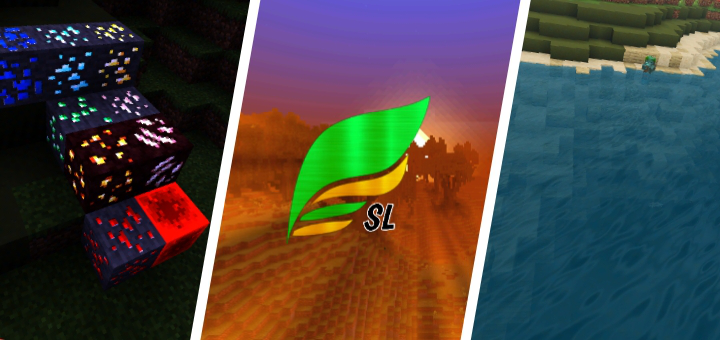
SL Shader is a shader pack to improve vanilla graphic, which will make your minecraft more beautiful.
SL stand for "Sapu Lidi" (Eng. Broom Stick), I chose this name because I often clean the bed using a broom stick, I don't know why I like this name for my shader.
Features:
- World coloring
- Lighting coloring
- Beautiful sky
- Shadow
- Realistic water
- Water wave
- Underwater caustic & wave
- Waving leaves & plants
- Sun reflection on water (sunrise & sunset)
- Fog
- Settings
- Etc
Experimental:
- Glowing ores
- Sunbeam
- Ground fog
- Blink torch
- Nether heat wave effect
- End sky effect (spiral)
Note: Experimental features can only be activated in settings.h
Select version for changelog:
Changelog
What's new in v2.5?
- Added experimental features (settings)
- Added glowing ores (settings)
- Added sunbeam (settings)
- Added ground fog (settings)
- Added nether heat wave effect (settings)
- Added entity coloring
- Added clear water
- Better end sky effect : spiral (settings)
- Better other dimension shading (nether & the end)
- Better dawn & dusk
- Improve sky
- Improve cloud
- Improve water
- Improve underwater
- Improve blink torch (settings)
- Fix shining water at night
- Fix bugs in MC 1.16.200+
- Fix some bugs
- Etc
Other:
change the link because it is blocked by the antivirus


But I don't know how to activate them
The experimental has so many button/options
Should I activate all?
The lava light is purple that of the magma blocks is purple that of the redstone torches is purple in fact any light is purple please fix it PLSSSS